As I told you before, I sent my game to
minijuegos. Pablo (from the Games Sumissions Team) liked the game and told me to translate it and to add some
minijuegos.com logos.
So I decided to "internationalize" Mathix. Which means to allow the players to choose between both English and Spanish.
So this is the way I was able to do that:
I added a folder called
locale in the root directory of my project.
There I created two folders: en_US and es_AR (just because I am from Argentina, that's all).
I put the resource bundle in my application's mxml:
[ResourceBundle("messages")]
Then I tried to compile the code with FlashDevelop getting the following error:
Error: Unable to resolve resource bundle "messages" for locale "en_US".
Build halted with errors (fcsh).
=S
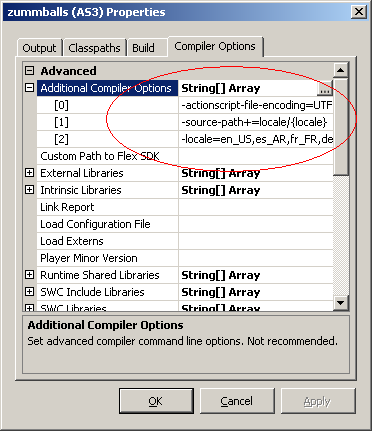
I looked at several blogs and forums and the only thing I found was that I could not add parameters to
fdbuild, but I could use the
@mxmlc tag instead.
So I added this line to my application's mxml:
Using the
QuickBuild option (
Ctrl + F8) I was able to compile my code with localization.
So, once I had my code compiling and running, I changed every hardcoded label for the proper key:
Now, lets give the users the options to change the language:
For more information about this, please refer to the Adobe documentation at
http://labs.adobe.com/wiki/index.php/Flex_3:Feature_Introductions:_Runtime_Localization
And
this is the result.
Update: you can also use this way of localizing a flex application.